Searching Metadata
Metadata Discovery lets you search the values of the Custom Metadata you attached when
uploading documents — a project name, a customer, a contract number — and get ranked results, not
just an exact filter. It is the metadata and both search scopes on POST /search.
This is different from Search Filters:
| Search Filters | Metadata search | |
|---|---|---|
| Request field | filters | scope: "metadata" or scope: "both" |
| Behavior | Exact constraint that narrows the candidate set | Ranked retrieval over metadata values |
| Effect on rank | None — filters never change rank | Produces ranked Evidence Results |
| Match style | Whole-value equality only | Exact, lexical, and semantic |
| Availability | Always on | Requires per-client Discovery Readiness |
Reach for filters when you already know the exact value to constrain by. Reach for metadata search when you want to find the documents whose metadata mentions something, or rank them alongside content matches.
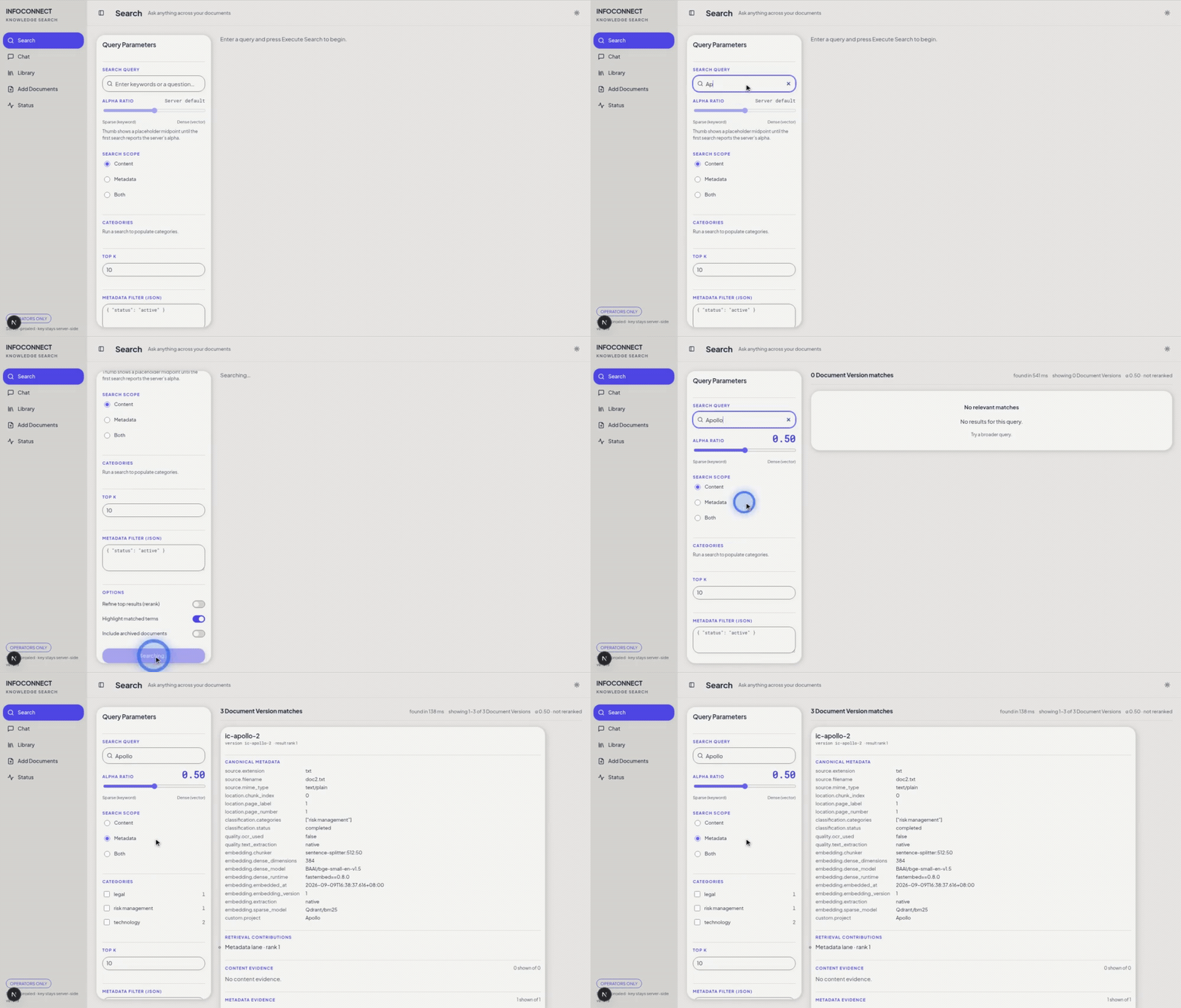
The word "Apollo" lives only in attached metadata: Content search finds nothing, while Metadata search returns the three documents carrying project = Apollo.
The three scopes
POST /search takes a scope. Values are case-insensitive; the lowercase canonical forms are
content, metadata, and both. Send scope explicitly in every request.
content(default) — searches indexed document text with hybrid dense/sparse retrieval. See Embeddings and Retrieval.metadata— searches typed Custom Metadata values only.both— runs the content and metadata lanes in parallel and merges them at one(document_id, version_id)identity.
All three return the same Evidence Result shape. A result row is one
Document Version, and it can carry content_evidence, metadata_evidence, or both, with
retrieval_contributions showing which lane matched.
Metadata search
curl -X POST http://localhost:8000/search \
  -H "X-API-Key: super-secret-key" \
  -H "Content-Type: application/json" \
  -d '{
    "query": "Apollo",
    "scope": "metadata",
    "limit": 5
  }'
Each matching row's metadata_evidence names the matched path, the typed value, and a
match_kind:
{
  "path": ["project"],
  "value": "Apollo",
  "value_type": "string",
  "match_kind": "exact"
}
Both lanes at once
curl -X POST http://localhost:8000/search \
  -H "X-API-Key: super-secret-key" \
  -H "Content-Type: application/json" \
  -d '{
    "query": "project management",
    "scope": "both",
    "limit": 10
  }'
Metadata search does an extra embedding-and-lookup pass over your metadata values, so it is a bit slower than content-only search. Expect a small, roughly constant overhead per query. The both scope adds that same metadata cost on top of content retrieval. Actual latency depends on your corpus size, load, and deployment, so benchmark against your own data instead of assuming a fixed number.
How metadata values match
Metadata matching is deterministic and has a fixed precedence. A value is matched value-first: its own eligibility is decided before any path context, and the same typed contract governs every retrieval branch — exact, lexical, and semantic — in initial retrieval and in paged evidence alike.
- Exact — normalized whole-value equality. Exact matches rank above lexical and semantic evidence.
- Lexical — the eligible value shares the required normalized query tokens.
- Semantic — the rendered value is embedded on its own and scored against the immutable
Metadata registry. The dense semantic floor for
BAAI/bge-small-en-v1.5is0.75; callers cannot lower or override it.
The typed contract classifies each query and value by shape before any non-exact match:
- Structured queries and values — complete identifiers, opaque codes, dates, and numbers —
are identities. They match only by whole-value equality:
INV-2024-0042never matchesINV-2024-0043, and2024-03-15never matches2023-03-15, no matter how similar they look. Spelled-out dates such as15 March 2024follow the same rule; letters-only hyphenated values such asHR-ITremain descriptive, while digit-bearing identifiers such asREG-261are structured. A structured query skips the lexical and semantic lanes entirely. - Mixed queries — descriptive words plus digit-bearing components — keep those components
verbatim:
Q3 Reportcan matchQ3 Report Draftbut neverQ4 Report. - Descriptive queries and values keep lexical matching plus independent semantic matching,
including short acronyms:
hrcan matchHuman Resourceseven with zero shared tokens.
A path can reject an otherwise-eligible lexical value when the path supplied the shared tokens, but path context can never rescue an ineligible value, and the path is never the embedding input. A path-only match therefore never qualifies.
Metadata matching uses only lossless Unicode, case, and whitespace normalization. Unlike content retrieval, it does not expand abbreviations, correct typos, fuzzily rewrite the query, or passage-rerank. That keeps typed values — identifiers, codes, names — matching predictably.
Availability: Discovery Readiness
metadata and both are opt-in and gated per client. A client can only use them once its existing
documents carry Metadata Leaves. Fresh ingests converge automatically, and the periodic
reconcile_discovery_readiness sweep covers published clients that never ingest again. The
Metadata Discovery backfill remains available
for repair and forced re-embed operations.
Until then, a metadata or both request returns 409 METADATA_DISCOVERY_NOT_READY — never an
empty or content-only answer. Content search always works, in every readiness state.
Check where your client stands with GET /discovery/readiness:
curl -H "X-API-Key: super-secret-key" http://localhost:8000/discovery/readiness
| State | Metadata / Both |
|---|---|
not_started | No — no backfill has run at the current Metadata Discovery version |
backfilling | No — a backfill is in progress |
blocked | No — a document violates the Custom Metadata contract and must be repaired |
ready | Yes — every accepted Document Version is represented |
If readiness reports blocked, repair the offending document with
PATCH /update and re-run the backfill. Readiness responses and backfill
reports carry paths, counts, and document identities — never a Custom Metadata value.
Metadata search is scoped to the client that owns the API key, like every other scope. Results,
readiness, and violations never cross clients, and client_id can never be used as a query,
filter, or metadata key.
Attaching metadata to documents
Metadata search only finds values you attached. Supply Custom Metadata at upload with
POST /embed, or change it later with PATCH /update. See
Metadata and Entities for the schema, the system-vs-custom boundary,
and the contract limits that keep values eligible.
Related
- Search Filters — exact constraints that narrow without ranking
- Embeddings and Retrieval — how the content lane ranks
- Metadata and Entities — the metadata schema and limits
- Search API — the full request/response contract
- Discovery Readiness API — the readiness endpoint
- Data Backfills — the operator backfill runbook